Did you know you can now interact with your GA4 data in several different ways? You can ask questions directly through the GA4 interface using Ask Advisor, or connect an AI agent through Google’s GA4 MCP server.
Last week, I ran a small test on tikum.cc, our vibe-coded test project. I asked exactly the same question:
“Analyse October performance of Tikum and compare it to September.”
First, I used Ask Advisor inside the GA4 interface. Then I used the GA4 MCP server through Antigravity CLI.
Same property, same data, same question.
But the answers were very different.
What GA4 Ask Advisor gave me
The good: For a basic performance overview, it does the job. It got the numbers right. Active users increased by 181% (from 185 to 520), while sessions grew by 183%.
It also spotted the traffic spike around 7 and 8 October and presented a clean trendline chart. I like this because you can immediately see what’s happening throughout the month.
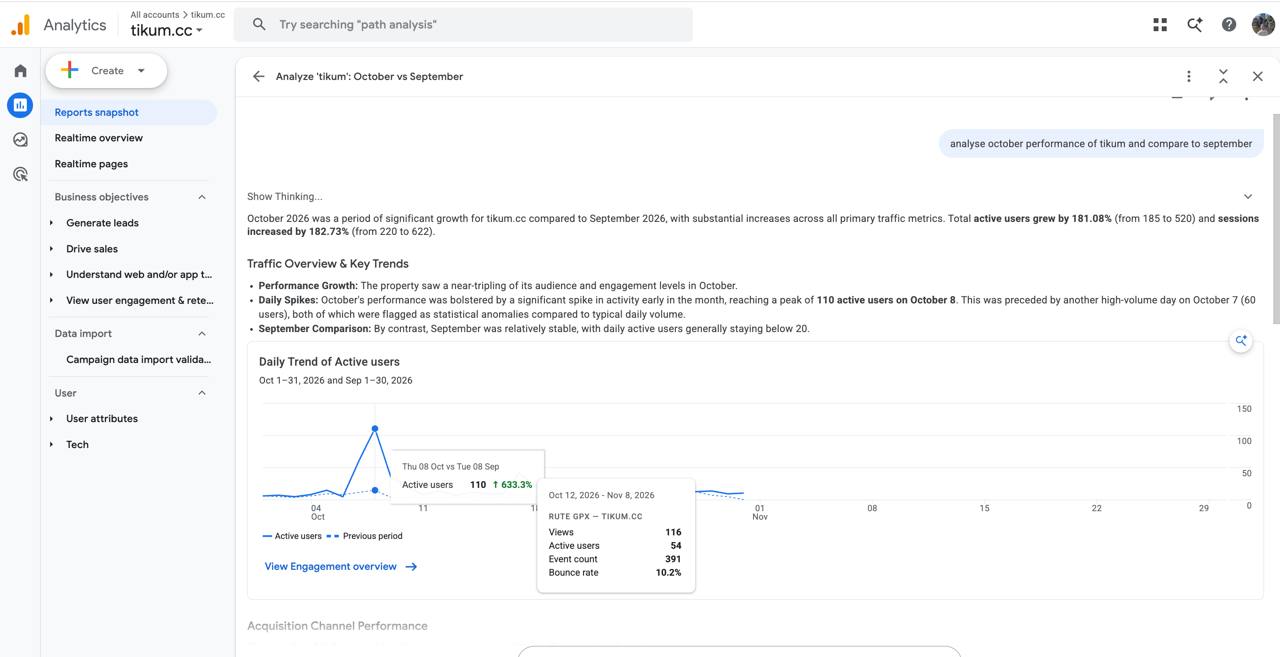
It’s a good pulse check. If someone walks past my desk and asks, “How’s the site doing?”, this is probably enough to give them an answer.
What’s still missing: It tells me what happened, but doesn’t really investigate why it happened or what I should do next.
What the Antigravity CLI gave me
For this test, I used Antigravity CLI with the GA4 MCP server. It took over a minute to process the question and ran seven separate run_report calls.
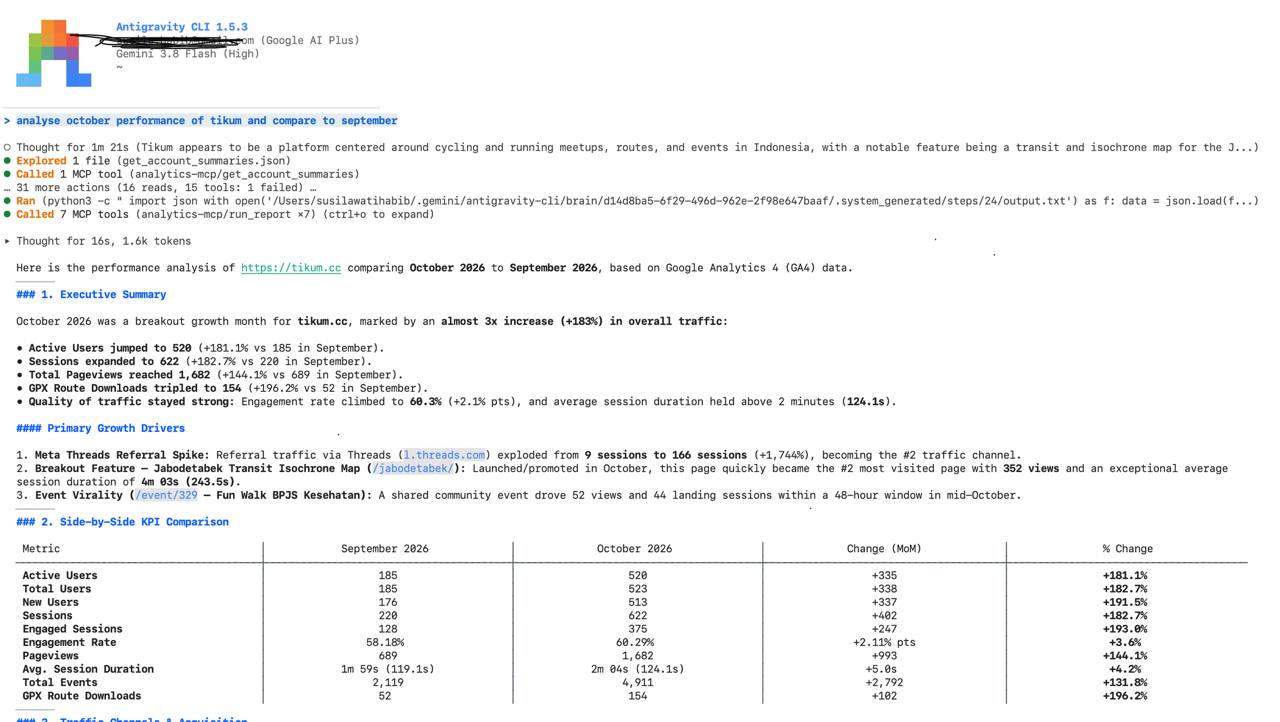
It started with traffic, then looked at channels, pages and custom events, connecting the findings into one bigger picture.
The good:
Instead of simply telling me there was a traffic spike on 8 October, it investigated further and found:
- The spike was largely driven by a Threads post linking to our
/jabodetabek/transit map. Sessions from Threads went from 9 to 166. - The transit page became our second most visited page, with visitors spending over 4 minutes on it. That’s our stickiest content.
- The mid-October bump came from a community event page, Fun Walk BPJS Kesehatan, which was also promoted through Threads.
- Jakarta users increased by 315%, while GPX downloads nearly tripled to 154.
- ChatGPT also started sending traffic to the website. Still relatively small, but interestingly, visitors landed directly on train station pages.
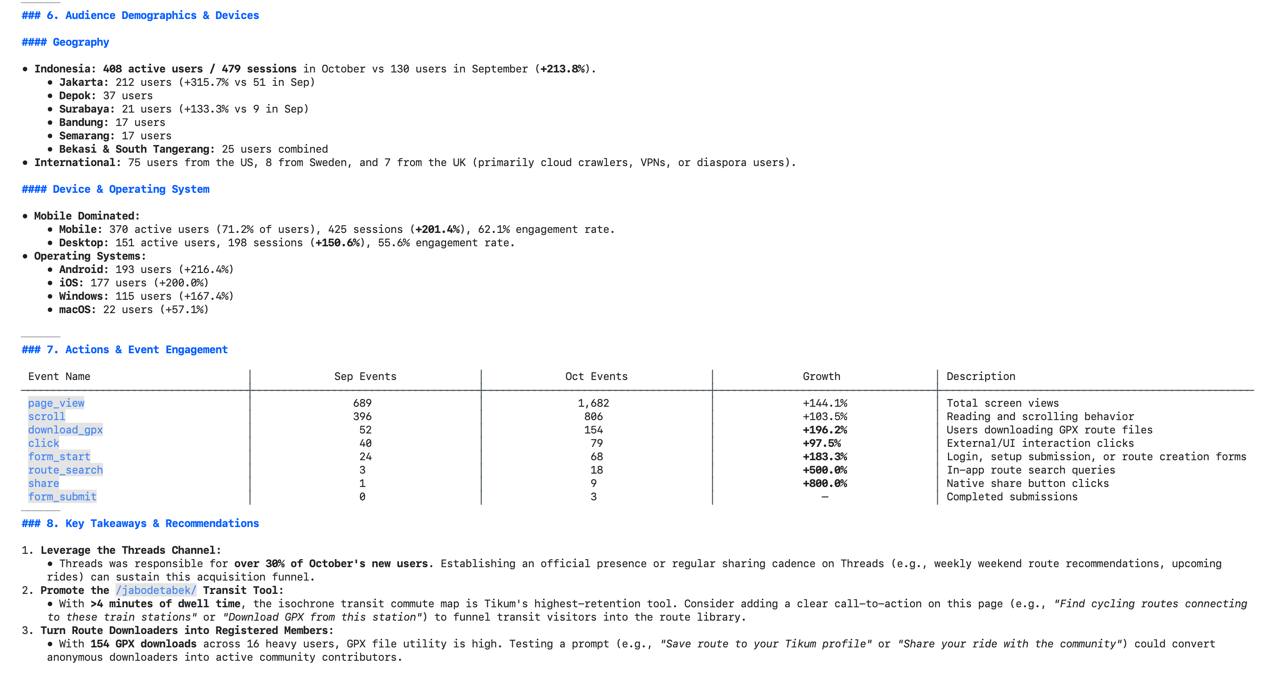
And it didn’t stop at the analysis. It suggested adding a clear CTA on the transit page to move those highly engaged visitors towards the route library.
It also suggested prompting GPX downloaders to save their routes to a Tikum profile, potentially turning anonymous users into registered members.
Now, that’s more than a basic performance report. It’s connecting the dots between traffic acquisition, content engagement, user behaviour and potential business opportunities.
Why is the gap so big?
It’s not that one tool has better data. Both are reading the same GA4 property.
The difference is how they approach the question.
The native advisor gives you an answer based on its reporting capabilities. The agent can decide that the first answer isn’t enough, go back to the data, break it down by channel, investigate individual pages, look at events and connect the findings.
That’s much closer to how a human analyst works. We rarely stop at the first chart, lol.
And the MCP part matters. It’s the bridge that allows the AI model to interact with the GA4 API and retrieve data directly, rather than relying on me to export CSVs and paste everything into a chatbot.
Now, the honest bit.
I don’t want to oversell this because there are still things that need human judgement.
1. Ask Advisor is still in beta.
So we might see improvements in its capabilities over time. One advantage is that you don’t need to set up anything extra. You can access it directly through the GA4 interface.
2. Context matters.
The numbers are relatively small. 124 sessions on a peak day is a good day for a family project, but I wouldn’t call it a viral moment. A 1,744% increase from 9 sessions sounds impressive, but the starting point matters. The CLI described it as “viral” and “breakout”. I’d tone that down.
3. Not everything is a fact.
The agent suggested that the 75 users from the US were primarily cloud crawlers, VPNs or diaspora users. That’s a reasonable hypothesis, but GA4 didn’t actually tell us that.
We need to distinguish between what the data shows and what the AI assumes.
4. It missed something important.
There were 68 form_start events but only 3 form_submit events.
That’s a potential funnel problem sitting right there in the event data, and the agent didn’t flag it.
A human analyst would probably have circled that first.
So, the agent is a very good first analyst. It does a lot of the legwork in a minute that might otherwise take me an hour.
But judgement still matters. What’s real, what’s noise, what needs further investigation and, most importantly, what should we do about it?
The takeaway
If you work in analytics, I think the question is no longer “Can AI read my GA4 data?”
Both can.
The more interesting question is whether your AI tool can actually investigate the data, or whether it can only report what’s already there.
For a quick pulse check, GA4 Ask Advisor is perfectly fine.
But for deeper analysis, I’d prefer the agent approach, with human analyst enrichment and, of course, additional data sources to validate and strengthen the findings.
Because getting the numbers is one thing. Knowing what they actually mean and what to do next is another.
Get the weekly performance digest
Weekly marketing insights from the Analisia team, straight to your inbox.